
How to Find Non-Phone Work From Home Jobs on Indeed in 2026
August 10, 2026

Trending Finds Readers Are Loving
Explore affordable luxe discoveries people are clicking on right now.
See What's TrendingFinding a work-from-home job sounds simple until you actually start searching.
You type “remote” into a job board and suddenly you’re scrolling through customer service positions, call centers, sales jobs, collections roles, and positions that require you to spend most of the day on the phone.
But remote work does not automatically mean phone work.
There are legitimate non-phone work-from-home jobs in areas such as data processing, claims, billing, payment operations, administrative support, quality assurance, medical records, content moderation, written customer support, and other back-office operations.
The challenge is knowing what to search for, how to read the job description, and how to determine whether a position is actually non-phone before spending time applying.
If you’re using Indeed to look for remote work, here’s how to make your search more strategic.
What Is a Non-Phone Work From Home Job?
A non-phone remote job is generally a position where making or receiving telephone calls is not one of your primary daily responsibilities.
Instead, your work may involve:
- Processing information
- Reviewing documents
- Researching accounts
- Entering or validating data
- Processing claims
- Reviewing transactions
- Responding through email or chat
- Updating records
- Performing quality checks
- Reviewing content
- Reconciling information
- Processing payments
- Completing administrative tasks
However, there is an important distinction.
Non-phone does not necessarily mean you will never speak to anyone.
A remote employee may still attend team meetings, communicate with coworkers through Microsoft Teams or similar platforms, participate in training sessions, or occasionally speak with a manager or another department.
When most job seekers say they want a non-phone position, they’re looking for work where they aren’t sitting in a customer call queue for most of their shift.
Those jobs exist.
You just have to know how to find them.
How to Search for Non-Phone Jobs on Indeed
One of the biggest mistakes you can make is searching only for:
“Work from home jobs.”
That’s extremely broad.
Instead, think about the type of work you want to perform.
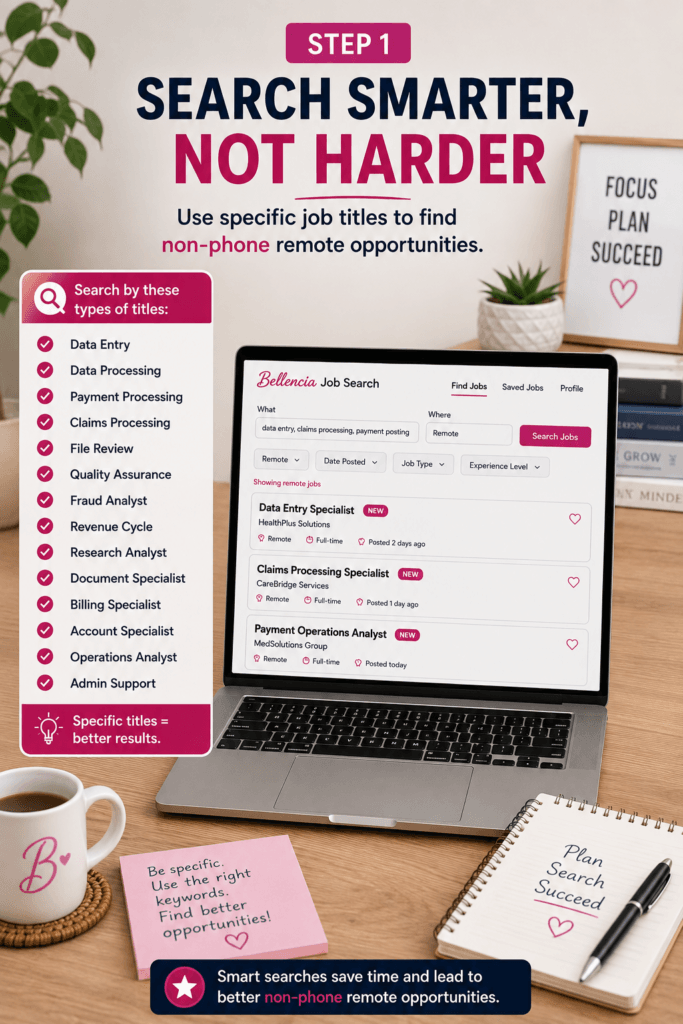
Search for specific job functions and titles, and then investigate the results to determine whether the actual responsibilities are non-phone.
Data and Processing Jobs
Consider searching for titles such as:
- Data Entry Specialist
- Data Processing Specialist
- Document Processing Specialist
- Data Verification Specialist
- Records Specialist
- Operations Processor
- Document Management Specialist
- Order Processing Specialist
These positions can involve processing, reviewing, entering, organizing, or validating information.
But remember: the title alone doesn’t guarantee that the job is non-phone.
Always read the complete description.
Healthcare Administrative Jobs
Healthcare has many administrative and revenue-cycle positions that can sometimes be performed remotely without spending the entire day speaking with patients.
Titles worth researching include:
- Claims Processor
- Medical Records Specialist
- Payment Posting Specialist
- Cash Poster
- Billing Specialist
- Revenue Cycle Specialist
- Refund Specialist
- Credentialing Specialist
- Claims Examiner
- Document Management Specialist
Be particularly careful with titles such as Patient Account Representative or Billing Representative because responsibilities vary dramatically between employers.
One company may use the employee primarily for account research and processing.
Another may expect that same position to make or receive calls throughout the day.
Again, read the responsibilities — not just the title.
Financial and Payment Operations Jobs
Another area worth exploring is financial and payment operations.
Search for titles such as:
- Payment Operations Specialist
- Fraud Analyst
- Transaction Analyst
- Dispute Specialist
- Chargeback Specialist
- Reconciliation Specialist
- Settlement Specialist
- Operations Analyst
- Payment Processor
Some of these positions involve investigating transactions, reviewing documentation, processing exceptions, reconciling accounts, monitoring activity, and working across multiple systems.
Not every position will be non-phone, but these searches can uncover opportunities that aren’t traditional customer service.
Written Customer Support Jobs
Maybe you actually enjoy helping customers — you just don’t want to talk on the phone all day.
Look for positions involving:
- Chat Support
- Email Support
- Messaging Support
- Customer Support
- Community Support
Be especially careful with general titles such as Customer Support Specialist.
A company may advertise chat and email support while also expecting employees to take calls.
The job description should clearly tell you which communication channels you’ll be responsible for.
Use Indeed’s Remote Filter
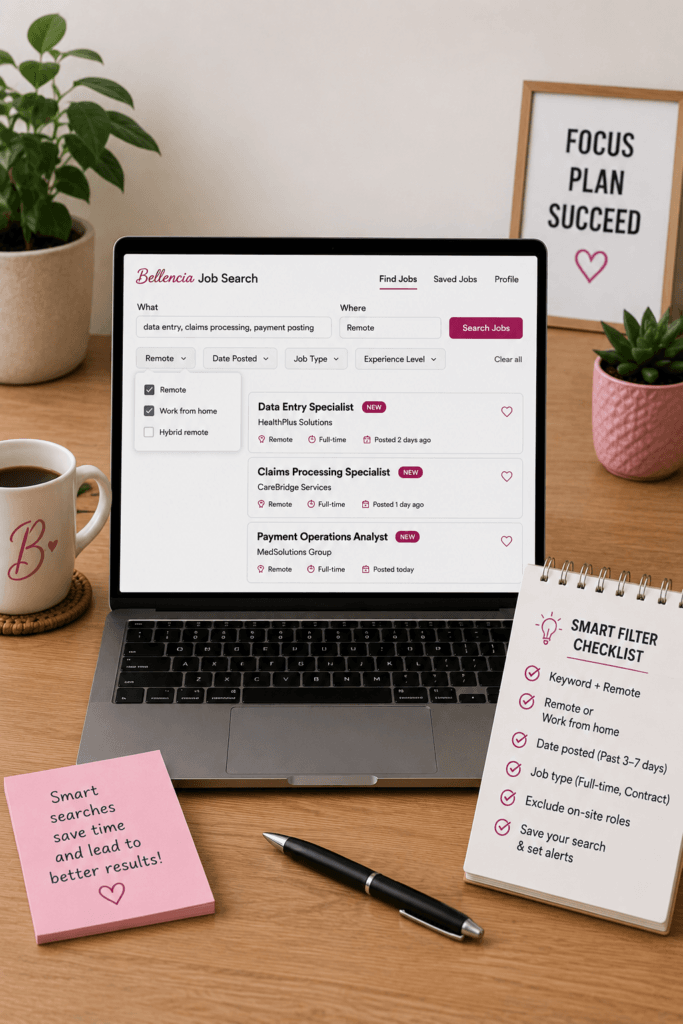
After entering the type of position you’re interested in, use Indeed’s available filters to narrow your results.
Select Remote when you’re specifically searching for work-from-home opportunities.
You may also be able to narrow your results using things such as:
- Date posted
- Pay
- Job type
- Experience level
- Education requirements
When possible, pay attention to recently posted opportunities.
Remote positions can attract large applicant pools, and finding an opportunity early gives you more time to properly review the position, tailor your resume, and submit a strong application.
But don’t rush.
Being early doesn’t matter if you’re applying to something you aren’t qualified for — or something that isn’t even what you thought it was.
Don’t Assume the Location Listed Means You Can’t Apply
Remote job locations can be confusing.
You may find a remote position that displays a city or state such as Texas, Florida, or New York.
That does not always mean applicants must live in that location.
Sometimes the location shown may be connected to the company’s corporate office, the department hiring for the position, or the location associated with the posting.
The actual position may still allow employees to work remotely from multiple states or throughout the United States.
On the other hand, some employers really do restrict remote hiring to specific states.
That’s why you should open the complete job description before deciding you’re ineligible.
Look for language such as:
- “Remote — United States”
- “Remote nationwide”
- “Work from anywhere in the U.S.”
- “Candidates may reside in any U.S. state”
- “Remote in approved states”
- “Must reside in…”
- “Applicants must live within…”
- “This position is not available in…”
- A specific list of eligible states
For example, suppose a search result displays:
Remote — Texas
Don’t immediately scroll past it just because you don’t live in Texas.
Open the job description.
If the employer states that the position can be performed remotely throughout the United States or includes your state among its approved locations, you may still be eligible.
The opposite is also true.
A listing that simply says Remote doesn’t necessarily mean the employer can hire someone in all 50 states.
There may be geographic restrictions farther down in the description.
Remember This Rule
Don’t disqualify yourself based solely on the location displayed in the search results.
Open the posting and verify the employer’s actual remote-work eligibility requirements first.
How to Tell If a Job Is Actually Non-Phone
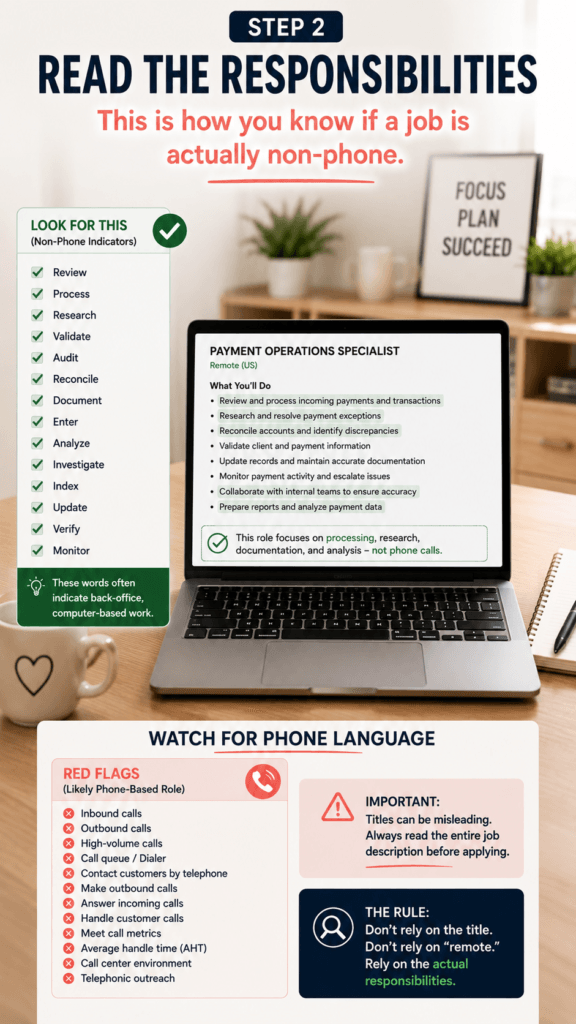
This may be the most important part of your search.
Don’t rely solely on the job title.
Don’t rely solely on the word “remote.”
And don’t assume something is non-phone simply because it appeared after you searched for non-phone work.
Open the complete job description.
Then look for sections such as:
Responsibilities
Essential Duties
What You’ll Do
Job Duties
Day-to-Day Responsibilities
Now look at what the employee will actually spend their time doing.
A promising non-phone position may repeatedly use words such as:
Review
Process
Research
Validate
Audit
Reconcile
Document
Enter
Analyze
Investigate
Index
Update
Verify
Monitor
Those words don’t automatically guarantee that a position is non-phone.
But they can indicate that the core responsibilities are centered around processing, research, documentation, analysis, or operations.
Now do the opposite.
Search the description for phone-related responsibilities.
Phone Language You Should Watch For
Look carefully for phrases such as:
- Inbound calls
- Outbound calls
- High-volume calls
- Call queue
- Dialer
- Contact customers by telephone
- Make outbound calls
- Answer incoming calls
- Handle customer calls
- Meet call metrics
- Talk time
- Average handle time
- Call center environment
- Telephonic outreach
If several of those phrases appear in the primary responsibilities, you probably haven’t found the type of non-phone position you’re looking for.
Sometimes the telephone requirement isn’t mentioned until farther down the listing.
That is why you should read the entire job description before applying.
Don’t Let the Job Title Fool You
Job titles aren’t standardized.
A Claims Specialist at one company might spend the majority of the day reviewing and processing claims.
A Claims Specialist somewhere else might spend a substantial portion of the day speaking with customers.
The same problem can happen with titles such as:
- Patient Account Representative
- Customer Support Specialist
- Operations Specialist
- Collections Specialist
- Billing Specialist
- Enrollment Specialist
- Account Specialist
- Claims Representative
Two employers can use the exact same job title for completely different types of work.
Responsibilities matter more than titles.
Look at the Qualifications Before You Apply
Once you’ve determined that a position appears to be non-phone, don’t immediately hit Apply.
Read the qualifications.
Separate what you’re seeing into three categories.
Requirements You Meet
These are your strongest matches.
For example, if the employer wants someone with experience in documentation, Excel, account research, transaction processing, claims, data entry, or high-volume workloads and you have those skills, your resume should make them easy for the employer to find.
Transferable Skills
You don’t necessarily need to have held the exact same job title before.
Your previous experience may contain skills that transfer into another industry.
For example:
Fraud investigation may provide transferable research and analytical skills for certain claims, payment, dispute, compliance, or account-review positions.
E-commerce experience may provide transferable experience involving orders, refunds, inventory, online listings, shipping issues, data entry, or administrative processing.
Don’t look only at your previous job titles.
Look at what you actually did.
True Qualification Gaps
Some requirements aren’t easily replaced with transferable experience.
A position may require:
- A professional license
- A certification
- A particular degree
- Specific software experience
- Specialized technical knowledge
- Several years of industry-specific experience
Pay particular attention to words such as:
Required
Must have
Minimum qualification
Those requirements deserve more weight than something listed as preferred or nice to have.
Understanding the difference can prevent you from wasting time on positions where you’re unlikely to move forward.
Be Careful With “Non-Phone” Search Results
Here’s something that frustrates a lot of remote job seekers:
Searching for non-phone work-from-home jobs does not mean every result you receive will actually be non-phone.
Job search engines are trying to match your search with relevant listings, but that doesn’t mean every result will perfectly fit your intention.
Treat search results as leads to investigate — not guarantees.
Your search helps you discover the opportunity.
The full job description tells you what the opportunity actually is.
That principle also applies to location, salary, schedules, qualifications, and remote status.
Before You Apply on Indeed: Verify the Job First
You found something promising.
It’s remote.
The responsibilities appear to be non-phone.
You meet many of the qualifications.
You’re ready to apply.
Not quite yet.
Before submitting your resume, take a few additional minutes to verify that the position appears legitimate and, when possible, locate the opening through the employer’s official career website.
This extra step can help you avoid questionable listings and confirm that you’re applying for the correct position.
Step 1: Search for the Company Outside of Indeed
Open a new browser tab and perform a simple Google search for the employer.
Search:
Company Name + Careers
Look for the company’s official website and navigate to its:
Careers
Jobs
or
Employment Opportunities
section.
Make sure you’re actually visiting the company’s official website.
Then search the employer’s career page for the position you found on Indeed.
Step 2: Compare the Two Job Listings
If you locate the position on the company’s official career website, compare it with what you found on Indeed.
Check:
- Job title
- Company
- Location
- Remote status
- Responsibilities
- Qualifications
- Salary, if provided
- Requisition number or Job ID, if provided
The information should generally make sense together.
A matching requisition or job number can be particularly useful when verifying that you’re looking at the same position.
Step 3: If the Job Is on the Company’s Website, Consider Applying There
If you can locate the same opening through the employer’s official career website, I recommend considering the company’s application portal.
Think of Indeed as a job discovery tool.
Your process can become:
Discover on Indeed → Verify with the employer → Apply through the company’s official career page
Applying through the employer’s website also gives you another opportunity to review the original posting before submitting your information.
You can verify that the job is still active, confirm the requirements, and make sure you’re applying to the correct position.
What If You Can’t Find the Job on the Company’s Career Page?
Don’t automatically assume the listing is fraudulent.
There can be legitimate reasons a position appears on a job board but is difficult to locate on the employer’s website.
For example, the position may have recently closed, the company’s career search may use a slightly different title, or the third-party listing may not have been removed yet.
However, a job you cannot verify deserves additional caution.
Search the company’s career site using different pieces of information from the listing.
Try the:
Job title
Requisition number
Job ID
Department
Location
If you still can’t locate the position, don’t rush to provide sensitive information.
Still Unsure? Contact the Company
If the opportunity otherwise looks legitimate but you can’t verify it, contact the employer directly.
Importantly, obtain the company’s contact information independently from its official website rather than relying solely on contact information provided by an unverified recruiter or suspicious listing.
Explain that you found a position advertised online and would like to verify that it’s an active opening.
Have this information ready:
- Exact job title
- Requisition or job number, if available
- Location
- Recruiter’s name, if one was provided
- URL where you found the listing
Ask whether the position is currently being recruited for by the company.
If the employer cannot verify the position or tells you that the listing isn’t theirs, don’t apply through that listing.
Move on.
Protecting your personal information is more important than submitting one additional application.
Consider Skipping Easy Apply
The Easy Apply button is convenient.
That’s precisely why I wouldn’t make it the center of your job-search strategy.
Remote positions can receive significant interest, and modern AI-assisted and automated job-application tools have made it easier for job seekers to submit applications at scale.
Instead of focusing on how quickly you can submit another application, focus on submitting a stronger, verified application.
If the employer has the same position available on its official career website, consider taking the extra time to apply there.
Use those additional minutes to:
- Verify the position is still active
- Read the employer’s original job description
- Confirm your state is eligible
- Review required qualifications
- Tailor your resume
- Complete screening questions carefully
- Confirm the requisition number
- Create an applicant account when available
- Track the status of your application
Applying directly through the company’s website doesn’t guarantee an interview or guarantee that your application will receive priority.
But it does allow you to verify the opportunity and submit your application through an employer-controlled hiring process.
Don’t Let AI Turn Your Job Search Into a Numbers Game
AI can be incredibly useful during a modern job search.
You can use it to:
- Understand complicated job descriptions
- Identify important qualifications
- Improve resume wording
- Identify transferable skills
- Prepare for interviews
- Practice interview questions
- Organize applications
But there’s an important difference between using AI to improve your application and using automation simply to submit as many applications as possible.
More applications do not automatically produce better results.
Instead of:
Find → Click → Apply → Repeat
Try:
Find → Verify → Research → Match → Tailor → Apply → Track
Before submitting an application, ask yourself:
Is this position still active?
Can I verify the employer?
Am I eligible based on location?
Is this actually non-phone?
Do I meet the important qualifications?
Does my resume clearly demonstrate the experience they’re requesting?
Can I apply through the employer’s official career portal?
That’s a much more intentional job-search strategy.
Watch for Remote Job Scams
Remote job seekers should also be particularly cautious about scams.
Be skeptical when someone:
- Offers you a job without a reasonable interview or screening process
- Requests payment to obtain the job
- Asks you to purchase equipment through unusual payment methods
- Sends you a check and instructs you to purchase equipment
- Requests sensitive banking information unusually early
- Communicates from an email address that doesn’t reasonably match the employer
- Pressures you to make an immediate decision
- Refuses to provide information that allows you to verify the position
One of your strongest protections is simple:
Verify independently.
Don’t rely exclusively on information supplied by the person contacting you.
Find the employer’s official website yourself.
Find its career page yourself.
Find its official contact information yourself.
Then verify.
Create Indeed Job Alerts
Once you’ve found searches that consistently produce relevant positions, consider creating job alerts.
That allows new opportunities to come to you rather than requiring you to repeat the exact same search throughout the day.
But don’t automatically apply to everything that arrives.
Continue using the same process:
Open → Read → Verify Remote Eligibility → Check Phone Responsibilities → Review Qualifications → Verify Employer → Tailor → Apply → Track
The alert finds possibilities.
You still decide what’s worth your application.
Apply Strategically, Not Randomly

When you’ve been searching for work for a while, it can be tempting to believe you need to submit hundreds of applications.
But your application count isn’t the only number that matters.
You also want to pay attention to:
Applications → Interviews
Interviews → Offers
Offers → Hires
If you’re submitting dozens of applications without receiving interviews, that information can tell you something.
Maybe the jobs aren’t aligned closely enough with your experience.
Maybe your resume isn’t communicating your transferable skills.
Maybe you’re targeting positions with qualifications you don’t have.
Maybe your resume needs stronger keywords.
Maybe you’re applying too late.
Maybe you’re applying to roles that aren’t actually available in your state.
Instead of responding by blindly doubling your application volume, look at the quality and alignment of the applications you’re already submitting.
Your Non-Phone Remote Job Search Checklist
Before applying to a non-phone remote job you’ve discovered on Indeed, check the following:
✓ Is the position actually remote?
✓ Is my state eligible?
✓ Have I read the complete responsibilities?
✓ Are phone calls a primary responsibility?
✓ Do I meet the major required qualifications?
✓ Can I identify relevant transferable skills?
✓ Can I verify the employer?
✓ Can I locate the position on the company’s career website?
✓ Does the requisition or Job ID match, when provided?
✓ Have I tailored my resume to the actual position?
✓ Can I apply directly through the employer’s career portal?
✓ Have I saved or tracked the application so I know where I applied?
That process takes longer than clicking Easy Apply repeatedly.
That’s okay.
The goal isn’t to see how quickly you can submit applications.
The goal is to get hired.
Non-Phone Work From Home Jobs Are Out There
Finding non-phone remote work can take more effort because “non-phone” isn’t one universal job category.
The key is learning to search based on what you actually want to do.
Think:
Processing
Research
Documentation
Claims
Payments
Data
Quality
Records
Operations
Written support
Then investigate the actual position.
Remember:
A job title doesn’t tell you everything.
A location displayed in the search results doesn’t always tell you where the employer can hire.
A “remote” label doesn’t guarantee the position is available nationwide.
A non-phone search doesn’t guarantee every result is non-phone.
And a listing appearing on a major job board doesn’t mean you should skip verification.
Use Indeed to discover opportunities.
Use the employer’s official website to verify them.
Use the complete job description to evaluate them.
Use your resume to show why you’re qualified.
Then track what happens after you apply.
Looking for Non-Phone Remote Opportunities?
Bellencia Career Hub helps job seekers discover remote opportunities, organize their job search, strengthen their applications, and keep track of their progress.
Instead of losing track of dozens of applications, Bellencia members can follow opportunities through the job-search journey:
Saved → Applied → Interview → Offer → Hired
And if non-phone work is your priority, explore the Non-Phone Job Vault for opportunities focused on quieter, back-office, processing, administrative, and computer-based work.
Finding the opportunity is step one.
Getting yourself into the right opportunity is the goal.